
 By Callum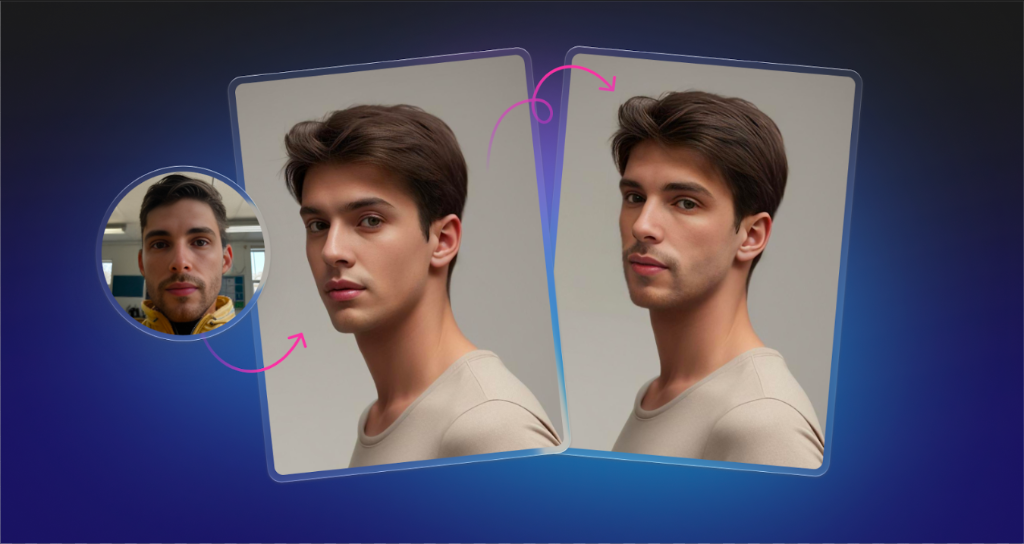
Face Swapper is a browser-based tool from Icons8 that swaps faces in still photos using a trained neural network instead of manual compositing. You upload a source image, choose a face to insert, and get a new frame that keeps the original lighting, perspective, and background. No plug-ins, no desktop installation, just a web app that runs on any modern machine with a stable connection.
How Face Swapper Works in Practice
The workflow is straightforward. You drag a JPG, PNG, or WEBP image into the interface, pick a second photo or choose one from the built-in gallery, then let the model process the pair. The service supports files up to a few megabytes, with faces up to 1024×1024 pixels and output in the same size and aspect ratio as the input. That matters for design teams who have to drop results straight into Figma, Photoshop, or a CMS without fixing scaling issues after every swap.
Under the hood, Face Swapper runs a face detection and alignment step, analyzes landmarks such as eyes, nose, mouth, and jawline, then reconstructs a blended face that matches the camera angle and lighting of the original shot. Because the system is optimized for production use rather than party filters, it is tuned to avoid the plastic, over-smoothed look that still plagues many consumer apps.
Image Quality, Poses, and Difficult Material
Icons8 positions Face Swapper as a high-resolution service, with swaps rendered at up to 1024 pixels on the face region. In practice that’s enough for social, web, and a large portion of print work. You can run typical marketing headshots, product lifestyle shots, or editorial portraits without the face turning into a blurry patch when zoomed.
The model is trained to handle more than passport-style portraits. It works with moderate pose variation, so side profiles, three-quarter views, and seated group photos stay usable instead of breaking the effect. It also copes with common obstacles such as glasses, hats, beards, and hair crossing the forehead. You still get edge cases where accessories cut through the swap region, but for most commercial images the output is clean enough to use as-is or retouch lightly.
Multiswap support is another practical feature. If you upload a group photo, you can reface several people in a single pass instead of processing each person separately. For teams who generate mood boards, concept visuals, or test campaigns, that cuts the time cost dramatically.
There is also a skin “beautifier” workflow: upload a photo, then upload the same image as the replacement face. The system effectively rebuilds the face and smooths minor imperfections while keeping identity intact. It is not a full retouching suite, but for quick corrections on internal decks or social content it removes a lot of cloning and healing work.
Use Cases Across Creative Roles
For graphic and product designers, Face Swapper is a fast way to test casting decisions, personas, and visual narratives without re-shooting material. You can reuse a single lifestyle scene and rotate different characters into it to match markets or buyer segments. That is especially useful when you need to align visuals with existing brand guidelines for diversity and representation.
Illustrators and concept artists can use swaps as photo references. Instead of hunting for the perfect stock model, you can generate a composite that matches a character’s age, expression, and angle, then paint or draw on top. The tool is not about final illustration output; it simply supplies reference material that fits the brief.
Design students and educators get a controlled way to discuss visual manipulation and its limits. Assignments can cover lighting consistency, perspective, and ethical boundaries, using swapped images as concrete examples rather than abstract case studies.
Marketing and content teams use Face Swapper to prototype campaign ideas quickly. Swap in different demographics, experiment with messaging variations, and evaluate which direction fits a brand before committing budget to a full shoot. For teams that want a simple browser-based ai face swap workflow they can standardize across design, product, and education projects, the key benefit is consistent, repeatable output.
Photographers and studios use the tool more carefully, but it still has a place on the production side. It helps salvage near-miss frames, create alternative versions for pitches, and test different expressions or subjects for composite work. You still need client consent and clear agreements, yet it can reduce the amount of reshooting for purely visual or editorial reasons.
For app developers, the main value is the Face Swapper API. Instead of building their own model and infrastructure, they can send images to Icons8’s service, receive swapped faces back, and plug them into avatar builders, social apps, educational tools, or content platforms. Because the service is part of the wider Icons8 ecosystem, it can sit alongside tools like Smart Upscaler or Background Remover inside a single pipeline.
Workflow, Pricing Model, and Operational Limits
Face Swapper runs entirely in the browser with server-side processing. That means no GPU upgrades on the client side, but it also means every project depends on the network. For small teams that live in design tools and browsers all day, that trade-off is acceptable.
The service offers a short free trial period on a subscription plan, then predictable paid tiers that unlock unlimited swaps, faster processing, and a storage window for generated images. The storage is there so teams can re-download assets without re-running compute-heavy jobs. Users who work with sensitive material can clear their history manually.
Technically, the limits are clear: photos up to a few megabytes, faces up to roughly one megapixel, and still images only. There is no direct video pipeline here. In return, the tool focuses on doing one thing reliably: swapping faces in single frames at a level suitable for commercial work.
Ethics, Compliance, and Risk Management
Any serious assessment of face swapping in 2025 has to address misuse. Deepfake scams, non-consensual image editing, and disinformation campaigns are a documented problem, and regulators are catching up. Several jurisdictions are introducing rules that treat AI-generated impersonation as a form of fraud, and professional guidelines increasingly emphasize consent, transparency, and clear labeling of synthetic media.
Icons8 leans on a straightforward model: the product is framed as a tool for design, marketing, education, and entertainment, and the public site explicitly reminds users to act responsibly. From a workflow perspective, responsible teams keep written consent from models, avoid misleading composites in news or political contexts, and document where swapped imagery appears.
For designers, illustrators, marketers, photographers, and developers, the practical takeaway is simple. Face Swapper delivers consistent, production-grade results for still images if you stay within its technical constraints and treat it as a professional instrument, not a toy. Used with consent and clear intent, it becomes another standard component in the visual toolbox rather than a shortcut to deceptive content.